

Elastic Beanstalk served us well for years. It allowed us to move fast, abstract infrastructure complexity, and focus on shipping product. But as the system matured, the very abstractions that once accelerated us started introducing operational friction.
In this article, we’ll walk through how we migrated a production Ruby on Rails application from AWS Elastic Beanstalk to a custom EC2-based infrastructure powered by Auto Scaling Groups. We’ll break down the reasoning behind the decision, the architectural redesign, and the step-by-step process that allowed us to execute the migration with zero downtime.
You’ll see:
- Why Elastic Beanstalk started limiting us in a mature production system
- How we redesigned our infrastructure using EC2 and Auto Scaling Groups
- The blue/green deployment strategy that eliminated downtime
- How we rebuilt observability with Grafana and Loki
- The migration phases, challenges, and lessons learned
- The measurable results after the cutover
By the end, you’ll have a clear picture of what it takes to move away from a managed PaaS and fully own your production infrastructure.
So without further ado, let’s get into it.
Why We Decided to Migrate
Elastic Beanstalk is a powerful PaaS. For early-stage products, it removes complexity and enables rapid deployment. However, long-lived production systems have different priorities: determinism, deep visibility, and runtime stability.
Over time, several issues began to compound.
Cost Inefficiency
Cost alone didn’t justify the migration, but it was an early indicator that we were paying for abstraction layers we no longer needed.
Immediately, we could compare both schemas.
Monthly AWS Costs (Elastic Beanstalk)
- EB Environment Fee: $0.01/hour × 730 hours = $7.30
- Classic Load Balancer: $22/month
- 2× EC2 t3a.small: $30/month
- RDS db.t3.micro: $30/month
- Data transfer: $5/month
- CloudWatch logs: $3/month
TOTAL: ~$97/month
Custom EC2 + ASG (Projected)
- Application Load Balancer: $16/month
- 2× EC2 t3a.small: $30/month
- RDS db.t3.micro: $30/month
- Data transfer: $5/month
- CloudWatch logs: $1/month
TOTAL: ~$82/month
Executing a correct migration from Elastic Beanstalk to custom EC2 instances would result in approximately $15/month (15.7%) in savings.
That number alone isn’t transformative. But it revealed something more important: we were paying for convenience layers — environment management, Classic Load Balancer defaults, platform coupling — that no longer provided proportional value to a mature production system.
The cost reduction was a side effect. The real win was control.
Limited Customization
Elastic Beanstalk manages the instance lifecycle. That includes:
- OS configuration
- Runtime installation
- Service orchestration
- nginx configuration
- Deployment flow
At first, this feels convenient. Over time, it becomes restrictive.
Customizing behavior means relying on .ebextensions and platform hooks — YAML files with embedded Bash scripts executed in a partially opaque order. Debugging failures becomes difficult. Logs are scattered across multiple locations. When an instance fails, it may be replaced automatically before proper root cause analysis is even possible.
As infrastructure grows in complexity, this abstraction layer makes the system harder to reason about.
What we need instead is:
- Deterministic startup order
- Explicit service definitions
- Predictable dependency management
- Clear ownership of runtime configuration
At that stage, the abstraction no longer reduces complexity — it hides it.
Deployment Artifacts Expiration
One of the most subtle but dangerous issues involved deployment artifacts. Elastic Beanstalk relied on build artifacts generated by GitHub Actions. Those artifacts expire after 90 days. If an auto-scaling event occurred months after the last deployment, the new instance might attempt to fetch an artifact that no longer existed.
Nothing in the code had changed — yet the instance could fail to launch.
Scaling events should be boring and predictable. In our case, they were time-sensitive and fragile. That coupling between historical CI artifacts and runtime infrastructure was unacceptable.
Ruby Version Constraints
Our application depended on Ruby 2.6.6 and OpenSSL 1.1. Meanwhile, newer Amazon Linux distributions ship with OpenSSL 3.
Elastic Beanstalk manages the underlying OS and runtime. When the platform updated, dependency changes occasionally broke compatibility. These incidents often surfaced during business hours and required urgent fixes.
Production infrastructure should not be a moving target controlled by upstream platform updates. We needed to explicitly own the runtime stack.
Observability Gaps
Elastic Beanstalk provides metrics and logs, but primarily at the instance level. That works for basic debugging, but it doesn’t give us system-wide visibility.
What we need is a unified, centralized view of production behavior.
We want:
- Log aggregation across all instances
- Real-time search during incidents
- Cross-instance traceability
- Long-term retention (30+ days)
- Custom dashboards combining infrastructure and application metrics
Downloading log bundles after an issue occurs isn’t observability. It’s reactive troubleshooting. True observability means detecting, diagnosing, and resolving issues with live data — not after-the-fact investigation.
Architecture
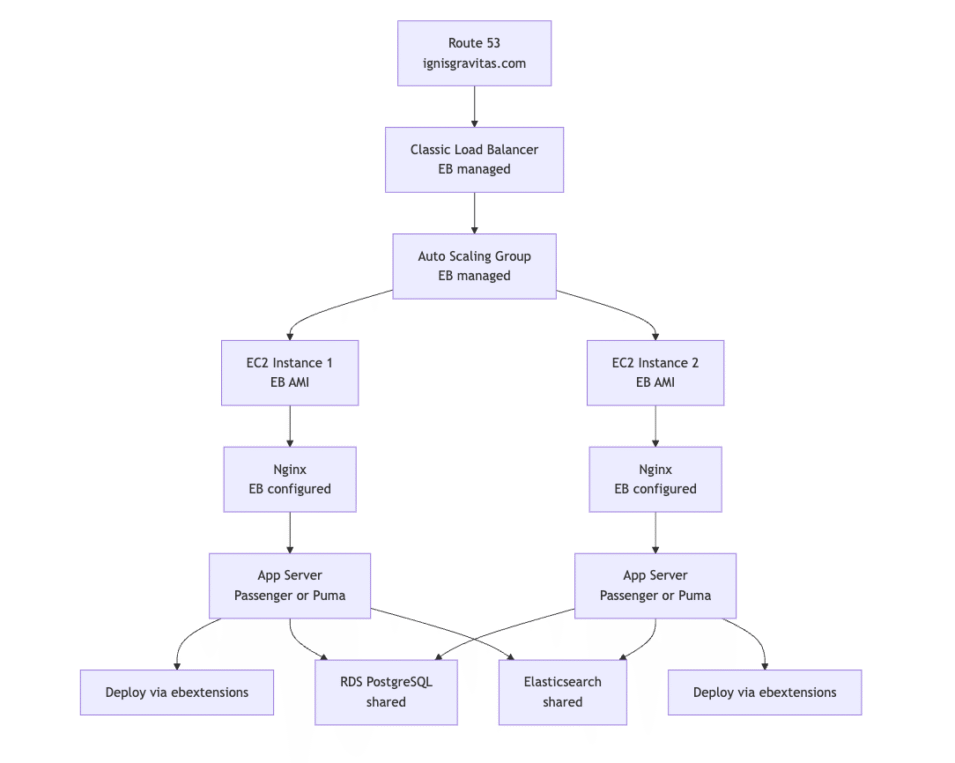
Before Migration
Before the migration, the infrastructure follows a standard Elastic Beanstalk-managed setup. The load balancer, auto scaling configuration, instance lifecycle, and application bootstrap are all controlled by the platform. While this simplifies initial deployment, it also means many runtime decisions happen implicitly. The diagram below illustrates how traffic flows from Route 53 through a Classic Load Balancer into EB-managed EC2 instances, where nginx and the application server are configured automatically by the platform.
Deployment Flow
The deployment process in Elastic Beanstalk relies on uploading an application version and triggering a platform-managed update. During this process, instances download the new artifact, execute .ebextensions scripts, and restart services in place. Because services are restarted on active instances, this flow inherently introduces brief downtime. The following diagram shows how a push to master propagates through CodeBuild and Elastic Beanstalk before reaching EC2 instances.
After Migration
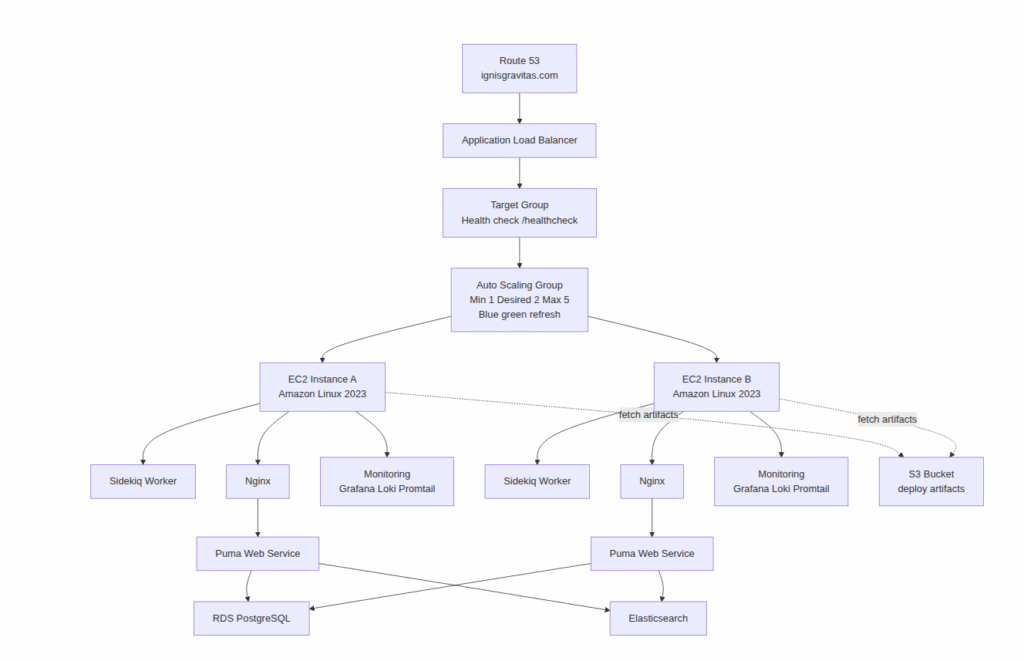
Custom EC2 + ASG Architecture
After the migration, the architecture maintains a similar high-level structure but shifts control to explicitly managed components. Instead of relying on EB-managed lifecycles, each EC2 instance bootstraps itself using versioned scripts. An Application Load Balancer distributes traffic across an Auto Scaling Group configured for blue/green instance refreshes. Monitoring services run alongside application services, providing full visibility into runtime behavior. The diagram below outlines the new flow and service responsibilities.
Custom CI/CD flow
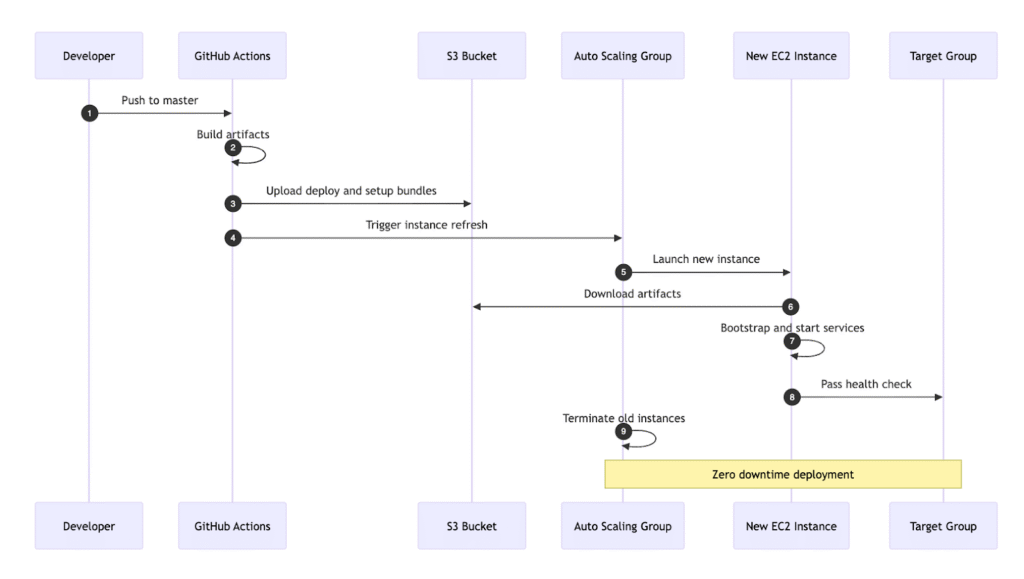
The CI/CD pipeline also changes significantly. Instead of pushing artifacts directly into Elastic Beanstalk, the deployment process builds the application in GitHub Actions, uploads the bundle to S3, and triggers an Auto Scaling Group instance refresh. New instances launch, fetch artifacts during bootstrap, pass health checks, and only then receive production traffic. This flow guarantees zero-downtime deployments and eliminates dependency on expiring CI artifacts. The diagram below illustrates the end-to-end pipeline.
The Migration Journey
Elastic Beanstalk does its job well for a long time. It allows teams to ship fast, abstracts away infrastructure concerns, and reduces operational overhead during the early stages of a product. But as the system matures, those same abstractions begin working against us.
At that stage, the goal is no longer just to “leave Beanstalk.” The objective becomes regaining control, predictability, and observability — while keeping downtime at zero.
Phase 1: Planning and Assessment (Week 1)
Before changing anything, we export the full Elastic Beanstalk configuration:
eb config save production –cfg production-snapshot
We audit every .ebextensions file to understand how the environment is being built. These files contain embedded shell scripts responsible for installing Ruby, configuring nginx, defining services, and setting up system dependencies.
This phase is less about implementation and more about eliminating unknowns. We document assumptions, identify hidden coupling, and map out potential risk scenarios.
We define mitigation strategies early:
- Blue/green deployment to eliminate downtime
- Parallel environments for safe validation
- IAM roles and Secrets Manager for secure configuration
- Observability implemented before cutover
Once everything becomes explicit, the migration stops being intimidating and becomes systematic.
Phase 2: Building Custom Infrastructure (Weeks 2–3)
Breaking the Monolith into Modular Setup Scripts
Elastic Beanstalk relied on large .ebextensions files containing long Bash scripts embedded inside YAML. One of them contained more than 150 lines of Ruby installation logic which was difficult to read, impossible to test locally, and painful to debug.
The first major architectural decision was to split this logic into focused, idempotent shell scripts. Each script had a single responsibility and could be executed safely multiple times.
For example, Ruby installation was extracted into a standalone script that handled OpenSSL compatibility, used rbenv, and exited early if Ruby was already installed. This immediately improved readability, testability, and failure diagnostics. Instead of guessing what Beanstalk did, we now owned the runtime.
The result was a set of nine scripts, executed in a strict order, each responsible for one concern: environment variables, packages, Redis, Node.js, Ruby, PDF tooling, directory layout, application deployment, and monitoring.
Moving Deployment Artifacts to S3
One of the most subtle issues with our previous setup was artifact expiration. GitHub Actions artifacts expire after 90 days, which means that auto-scaling events could fail months after the last deployment.
The solution was to decouple deployments from CI artifact retention entirely. GitHub Actions now builds the application once and uploads the deployment bundle to S3 with no expiration policy.
aws s3 cp deploy.tar.gz \
s3://ignisgravitas/deployments/ig_ror/deploy.tar.gz
New EC2 instances download artifacts directly from S3 during bootstrap. This guarantees that scaling events are deterministic, regardless of when they happen.
Implementing Blue/Green Deployments with ASG Instance Refresh
Instead of restarting services in place, we switched to instance refresh–based deployments using Auto Scaling Groups.
A deployment now triggers a rolling instance refresh with a minimum healthy percentage of 90 percent. New instances boot, install dependencies, deploy the application, and pass health checks before traffic is shifted. Old instances are only terminated once the new ones are confirmed healthy.
This change alone eliminated deployment-related downtime entirely.
Adding Real Observability with Grafana and Loki
Elastic Beanstalk’s built-in logging was sufficient for basic debugging but insufficient for real production observability.
We introduced a self-hosted Grafana, Loki, and Promtail stack running in Docker on each instance. Application logs, nginx logs, and background job logs are all streamed and aggregated centrally. Logs are searchable in real time, retained for more than 30 days, and correlated across instances.
For the first time, production debugging stopped feeling reactive.
Phase 3: Parallel Testing (Week 4)
Rather than cutting over immediately, we ran both environments side by side.
The primary domain continued serving traffic from Elastic Beanstalk, while a subdomain routed traffic to the new Auto Scaling Group. This allowed us to validate behavior under real conditions.
We tested:
- Deployments,
- Load handling,
- Auto scaling behavior, and
- Monitoring visibility.
Several issues surfaced, including nginx caching dynamic JavaScript responses, Redis container restart races, Puma socket permission problems, and Secrets Manager edge cases. Each issue was fixed systematically before proceeding.
By the end of this phase, the new environment behaved identically to production, but with better tooling and fewer unknowns.
Phase 4: Production Cutover (Week 5)
The final transition uses Route 53 weighted routing. Traffic shifts gradually from 10% to 50%, and finally to 100%, with monitoring between each step.
After 24 hours of stable operation, Elastic Beanstalk is permanently terminated. No downtime occurs.
Implementation Highlights
Certain implementation decisions had outsized impact.
Idempotent Setup Scripts
Every bootstrap script:
- Fails fast
- Checks whether work is already done
- Performs a single responsibility
- Verifies success
This made instance launches predictable and repeatable.
Atomic Deployments
Deployments use timestamped release directories and atomic symlink switches. Partial deployments never affect live traffic.
Explicit Runtime Ownership
Ruby 2.6.6 requires OpenSSL 1.1, while Amazon Linux 2023 ships with OpenSSL 3. Instead of fighting the OS, we compiled OpenSSL 1.1 from source and built Ruby against it.
The runtime is now insulated from upstream OS changes.
Results
The migration delivered measurable improvements:
- 15% lower infrastructure costs
- 40% faster deployments
- Zero deployment downtime
- Centralized, real-time observability
- Complete infrastructure control
More importantly, infrastructure became predictable again. And predictable systems are resilient systems.
Final Thoughts
Migrating away from Elastic Beanstalk is not a small change. It forces a team to rethink how deployments work, how instances are built, how failures are handled, and how much operational ownership they are willing to assume. But when infrastructure maturity demands predictability and control, that shift becomes necessary.
Running both environments in parallel is one of the most important decisions in the entire process. Parallel testing removes pressure from the migration and allows real validation under production traffic before committing fully. Confidence doesn’t come from optimism — it comes from evidence.
Breaking infrastructure logic into modular, idempotent scripts fundamentally changes how the system behaves. Debugging becomes faster. Failures become easier to reason about. Bootstrap behavior becomes explicit instead of implicit. Combined with S3-based deployment artifacts, this removes an entire class of failures tied to artifact expiration and historical CI state.
Blue/green deployments using Auto Scaling Group instance refreshes deliver what managed abstractions often promise but don’t fully guarantee: predictable, repeatable, zero-downtime releases. With infrastructure-level health checks enforcing minimum healthy capacity, deployments become boring again — exactly what production systems require.
Observability completes the picture. Centralized logging and real-time visibility transform incident response from reactive to proactive. Instead of waiting for user reports, the system exposes its own signals.
If we distill the migration into core lessons, they are these:
- Run environments in parallel before cutting over
- Make bootstrap scripts idempotent and explicit
- Decouple deployments from CI artifact expiration
- Enforce health checks at the infrastructure level
- Centralize logs before you need them
From a measurable standpoint, the migration delivers ~15% lower costs, ~40% faster deployments, and zero downtime during releases. But the most meaningful outcome isn’t financial or performance-based.
It’s ownership.
The infrastructure behaves exactly as defined — during deployments, scaling events, and incidents. And in production engineering, that level of predictability is far more valuable than convenience.
FAQs
Why migrate from Elastic Beanstalk to EC2?
Elastic Beanstalk is a strong choice for early-stage products because it abstracts infrastructure complexity. However, as systems mature, teams often require greater control over runtime configuration, deployment strategies, observability, and dependency management. Migrating to EC2 with Auto Scaling Groups allows full ownership of the instance lifecycle, deterministic deployments, and deeper production visibility.
Can you migrate from Elastic Beanstalk to EC2 without downtime?
Yes but it requires careful planning. In this case, zero downtime is achieved by:
- Running both environments in parallel
- Using blue/green deployments with Auto Scaling Group instance refresh
- Enforcing infrastructure-level health checks
- Gradually shifting traffic with weighted routing
When done correctly, traffic only reaches new instances after they are fully healthy.
Is migrating to EC2 cheaper than Elastic Beanstalk?
It can be, but cost savings are usually not the primary driver. In this migration, infrastructure costs decrease by approximately 15%. The bigger benefit is eliminating abstraction overhead and gaining predictable infrastructure behavior. Cost reduction becomes a side effect of increased control.
What is the biggest risk during an Elastic Beanstalk migration?
The biggest risk is insufficient validation before cutover. Skipping parallel testing or relying solely on theoretical correctness increases the chance of production incidents. Running both environments simultaneously under real traffic conditions is one of the most effective ways to reduce migration risk.