


In today’s microservices architecture, you might have several services in one repository, you even may have a monorepo with all your applications in a single place! But what if only a single service changed? What if a subset of them changed? In this tutorial, we’ll set up a GitHub Action that:
- Detects changes in the app/** folder (you may modify the name based on your personal need) where multiple microservices live.
- Builds and pushes Docker images only for the changed services.
- Triggers a deployment using ArgoCD (but you may want to use a different CD tech, no worries).
Let’s dive in step-by-step!
Prerequisites
Before you begin, make sure you have:
- A GitHub repository set up
- Basic knowledge of Docker and GitHub Actions
- GitHub CLI installed (for managing secrets)
- Docker installed on your machine
- A working ArgoCD installation
Step 1: Setting Up Your Repository & Folder Structure
Assume you have a repository with multiple microservices, each with its own Dockerfile. Your repository might look like this:
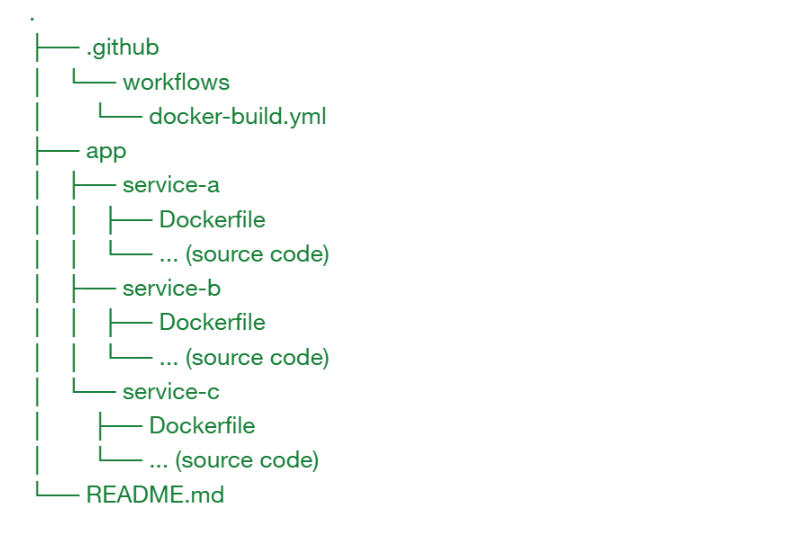
Here, our GitHub Action will only build images for the services that changed.
Step 2: Creating the Dynamic GitHub Action Workflow
We need to first detect which microservices in the app/ folder have changed. We’ll do this in a dedicated job that creates a dynamic matrix for the build job.
Create the file .github/workflows/docker-build.yml with the following content:
name: Docker Build for Changed Microservices


on:
 push:
   paths:
     - 'app/**'


jobs:
 detect:
   name: Detect Changed Services
   runs-on: ubuntu-latest
   outputs:
     matrix: ${{ steps.get-matrix.outputs.matrix }}
   steps:
     - name: Checkout Repository Code
       uses: actions/checkout@v3
       with:
         fetch-depth: 0


     - name: Determine Changed Services
       id: get-matrix
       shell: bash
       run: |
         cd $GITHUB_WORKSPACE
        echo "Detecting changes..."
        CHANGED_FOLDERS=$(git diff --name-only ${{ github.event.before }} ${{ github.sha }} app | awk -F/ '!($2 ~ /^(Dockerfile|SomeFileYouDoNotWantToDetect|Makefile)$/) {print $2}' | sort -u | xargs)
        echo "Changed folders: $CHANGED_FOLDERS"


        matrix="{\"include\": ["
        first=1
        for service in $CHANGED_FOLDERS; do
          if [ -f "app/${service}/Dockerfile" ]; then
            if [ $first -eq 0 ]; then
              matrix+=","
            fi
            matrix+="{\"service\": \"${service}\"}"
            first=0
          fi
        done
        matrix+="]}"

        echo "Matrix for build job: $matrix"
        echo "matrix=$matrix" >> $GITHUB_OUTPUT


     - name: Validate Matrix
       if: ${{ fromJson(steps.get-matrix.outputs.matrix).include[0] == null }}
       run: |
         echo "Output from previous step:"
        echo "${{ fromJson(steps.get-matrix.outputs.matrix).include.length }}"
        echo "${{ steps.get-matrix.outputs.matrix }}"
        echo "No services with a Dockerfile were changed. Exiting gracefully."
        exit 0


 build:
   name: Build & Push Docker Images
   needs: detect
   runs-on: ubuntu-latest
   if: ${{ fromJson(needs.detect.outputs.matrix).include[0] != null }}
   strategy:
     matrix: ${{ fromJson(needs.detect.outputs.matrix) }}
   env:
     DOCKER_USERNAME: ${{ secrets.DOCKER_USERNAME }}
     DOCKER_PASSWORD: ${{ secrets.DOCKER_PASSWORD }}
   steps:
     - name: Checkout Repository
       uses: actions/checkout@v3


     - name: Set up Docker Buildx
       uses: docker/setup-buildx-action@v2


     - name: Login to DockerHub
       uses: docker/login-action@v2
       with:
         registry: ghcr.io
         username: juliolugo96 # Change to your Github username
         password: ${{ github.token }}


     - name: Build and Push Docker Image for ${{ matrix.service }}
       uses: docker/build-push-action@v4
       with:
         context: ./app/${{ matrix.service }}
         file: ./app/${{ matrix.service }}/Dockerfile
         push: true
         tags: ghcr.io/juliolugo96/${{ matrix.service }}:${{ github.sha }},ghcr.io/juliolugo96/${{ matrix.service }}:latest


     # - name: Trigger ArgoCD Deployment for ${{ matrix.service }}
     #   env:
     #     ARGOCD_TOKEN: ${{ secrets.ARGOCD_TOKEN }}
     #     ARGOCD_SERVER: ${{ secrets.ARGOCD_SERVER }}
     #   run: |
     #     curl -H "Authorization: Bearer ${ARGOCD_TOKEN}"           -X POST "https://${ARGOCD_SERVER}/api/v1/applications/your-argocd-app-${{ matrix.service }}/sync"
How It Works:
Such a beautiful yet simple code, right? Let me show you how it works:
- Detect Job:
- Checks out your repository.
- Uses git diff to determine which files in app/ changed.
- Extracts the service names (assumes structure app/<service>/…).
- Validates that a Dockerfile exists in each service folder.
- Outputs a JSON matrix containing only the changed services.
- Build Job:
- Runs for each service in the matrix.
- Checks out the repository and sets up Docker Buildx.
- Logs into GHCR using your secrets.
- Builds and pushes the Docker image for the specific service.
- Triggers an ArgoCD sync for the corresponding application.
Note: Adjust the Docker image tags and ArgoCD endpoints to match your environment.
Step 3: Defining Environment Variables & Secrets
Since our workflow relies on environment variables and secrets, you can automate their setup using the following shell script with GitHub CLI.
setup-secrets.sh
#!/bin/bash
# Ensure you are logged in with GitHub CLI: gh auth login
REPO=”your-github-username/your-repository”
# Set DockerHub credentials
gh secret set DOCKER_USERNAME –repo $REPO –body “your-dockerhub-username”
gh secret set DOCKER_PASSWORD –repo $REPO –body “your-dockerhub-password”
# Set ArgoCD credentials
gh secret set ARGOCD_TOKEN –repo $REPO –body “your-argocd-token”
gh secret set ARGOCD_SERVER –repo $REPO –body “your-argocd-server-address”
echo “Secrets have been set for $REPO!”
Run this script from your terminal:
chmod +x setup-secrets.sh
./setup-secrets.sh
Step 4: Deploying with ArgoCD
Once a Docker image is built and pushed, our workflow triggers an ArgoCD sync. This sync uses a simple curl command to notify ArgoCD that the application (per microservice) has been updated.
If your deployment strategy is more complex, consider:
- Using theArgoCD CLI action.
- Creating dedicated ArgoCD projects for each microservice.
Check ArgoCD’sdocumentation for more advanced deployment configurations.
Wrapping Up
Congratulations! You now have a fully automated CI/CD pipeline that:
- Detects changes in individual microservices within the app/ folder.
- Builds and pushes Docker images only for the changed services.
- Triggers deployments via ArgoCD for each updated microservice.
This setup helps you efficiently manage multiple microservices within a single repository. Customize and expand the workflow to suit your project’s needs, and enjoy a smoother DevOps experience!
Want to see the full code in action? Check out the repository .